

[Sep 22, 2021] Associate-Android-Developer Dumps Full Questions - Exam Study Guide
Google Developers Free Certification Exam Material from PassExamDumps with 125 Questions
NEW QUESTION 14
What do you want from Room when you create a DAO method and annotate it with @Delete?
Example:
@Dao
public interface MyDao {
@Delete
public void deleteUsers(User... users);
}
- A. Room removes a set of entities, given as parameters, from the database. It uses the primary keys to find the entities to delete.
- B. Room modifies a set of entities, given as parameters, in the database. It uses a query that matches against the primary key of each entity.
- C. Room generates an implementation that inserts all parameters into the database in a single transaction.
Answer: A
NEW QUESTION 15
When using an ImageView, ImageButton, CheckBox, or other View that conveys information graphically. What attribute to use to provide a content label for that View?
- A. android:labelFor
- B. android:hint
- C. android:contentDescription
Answer: C
Explanation:
Reference:
https://support.google.com/accessibility/android/answer/7158690?hl=en
NEW QUESTION 16
Select a correct statement about PagedList.
- A. PagedList is content-accidental. This means that new content can be loaded into an instance of PagedList and the loaded items themselves can be changed to accidental values randomly.
- B. PagedList is content-mutable. This means that new content can be loaded into an instance of PagedList and the loaded items themselves can change once loaded.
- C. PagedList is content-immutable. This means that, although new content can be loaded into an instance of PagedList, the loaded items themselves cannot change once loaded.
Answer: C
Explanation:
Reference:
https://developer.android.com/topic/libraries/architecture/paging/ui
NEW QUESTION 17
For example, our preferences.xml file was added by addPreferencesFromResource (R.xml.preferences). Our preferences.xml file contains such item:
<SwitchPreference android:id="@+id/notification" android:key="@string/pref_notification_key" android:title="@string/pref_notification_title" android:summary="@string/pref_notification_summary" android:defaultValue="@bool/pref_notification_default_value" app:iconSpaceReserved="false"/> In our Fragment, we can dynamically get current notification preference value in this way:
- A. val isNotificationOn = PreferenceManager.getSharedPreferences (context).getBoolean( context!!.getString(R.string.pref_notification_default_value), context!!.getString(R.string.pref_notification_key), )
- B. val isNotificationOn = PreferenceManager.getSharedPreferences (context).getBoolean( context!!.resources.getBoolean(R.bool.pref_notification_default_value), context!!.getString(R.string.pref_notification_key) )
- C. val isNotificationOn = PreferenceManager.getDefaultSharedPreferences (context).getBoolean( context!!.getString(R.string.pref_notification_key), context!!.resources.getBoolean(R.bool.pref_notification_default_value) )
Answer: C
NEW QUESTION 18
By adding a RoomDatabase.Callback to the room database builder RoomDatabase.Builder (method addCallback(RoomDatabase.Callback callback)), we can: (Choose two.)
- A. set the database factory
- B. handle database opening
- C. disable the main thread query check for Room
- D. handle database first time creation
Answer: B,D
NEW QUESTION 19
Custom duration in milliseconds as a parameter for the setDuration method is available when you are working with:
- A. for none of them
- B. for both of them
- C. Snackbar
- D. Toast
Answer: C
NEW QUESTION 20
The diagram below shows a basic form of the recommended architecture for apps that use Architecture Components. The architecture consists of a UI controller, a ViewModel that serves LiveData, a Repository, and a Room database. Drag modules to correct places.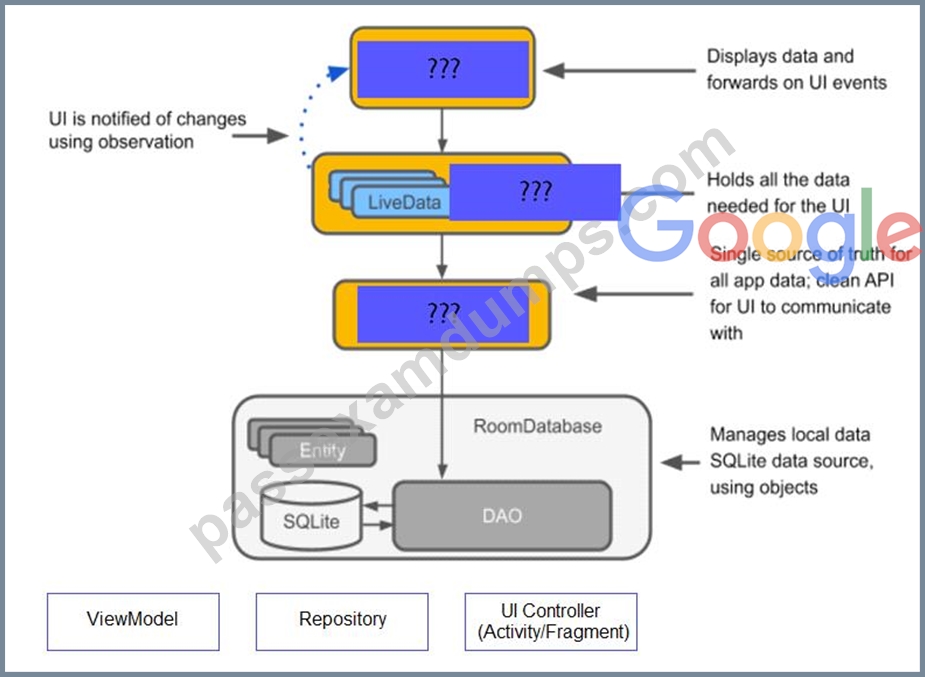
Answer:
Explanation: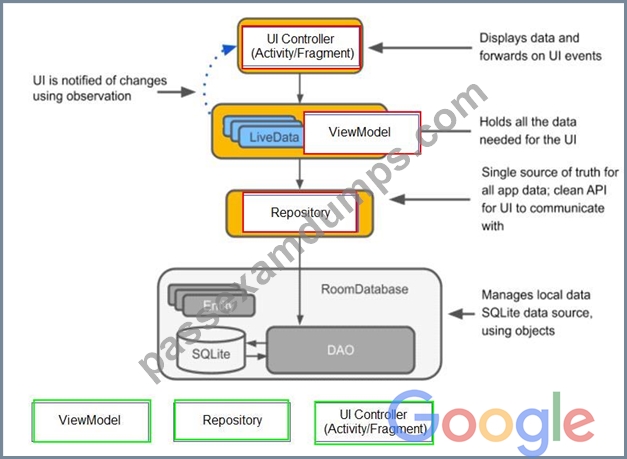
NEW QUESTION 21
For example, suppose that in a XML file (res/menu/menu_main.xml as an example), where menu items are described, we have such item:
...
<item
android:id="@+id/action_settings"
android:orderInCategory="100"
android:title="@string/menu_action_settings"
app:showAsAction="never" />
...
Attribute "app:showAsAction" shows when and how this item should appear as an action item in the app bar. What value "never" in this attribute means?
- A. Never place this item in the app bar. Instead, list the item in the app bar's overflow menu.
- B. Always place this item in the app bar. Avoid using this unless it's critical that the item always appear in the action bar. Setting multiple items to always appear as action items can result in them overlapping with other UI in the app bar.
- C. The action view associated with this action item (as declared by android:actionLayout or android:actionViewClass) is collapsible.
- D. Also include the title text (defined by android:title) with the action item. You can include this value along with one of the others as a flag set, by separating them with a pipe.
- E. Only place this item in the app bar if there is room for it. If there is not room for all the items marked by this value, the items with the lowest orderInCategory values are displayed as actions, and the remaining items are displayed in the overflow menu.
Answer: A
Explanation:
Reference:
https://developer.android.com/guide/topics/ui/menus
NEW QUESTION 22
About queries in DAO classes. Room verifies the return value of the query such that if the name of the field in the returned object doesn't match the corresponding column names in the query response, Room alerts you in one of the following two ways: (Choose two.)
- A. It gives a warning if no field names match.
- B. It gives an error if no field names match.
- C. It gives a warning if only some field names match.
- D. It gives an error if only some field names match.
Answer: B,C
NEW QUESTION 23
When your code execution reaches the breakpoint, Android Studio pauses execution of your app. You can
- A. continue running the app normally
- B. advance to the next line in the code (without entering a method)
- C. advance to the next line outside the current method
- D. advance to the first line inside a method call
- E. evaluate an expression at the current execution point
- F. examine the object tree for a variable; expand it in the Variables view
Answer: E
NEW QUESTION 24
The easiest way of adding menu items (to specify the options menu for an activity) is inflating an XML file into the Menu via MenuInflater. With menu_main.xml we can do it in this way:
- A. @Override
public boolean onCreateOptionsMenu(Menu menu) { getMenuInflater().inflate(R.menu.menu_main, menu); return true;
} - B. @Override
public boolean onOptionsItemSelected(MenuItem item) {
getMenuInflater().inflate(R.menu.menu_main, menu);
return super.onOptionsItemSelected(item);
} - C. @Override
protected void onCreate(Bundle savedInstanceState) {
super.onCreate(savedInstanceState);
setContentView(R.menu.menu_main);
}
Answer: A
Explanation:
Reference:
https://developer.android.com/guide/topics/ui/menus
NEW QUESTION 25
When using an EditTexts or editable TextViews, or other editable View. What attribute to use to provide a content label for that View?
- A. android:hint
- B. android:labelFor
- C. android:contentDescription
Answer: A
Explanation:
Reference:
https://support.google.com/accessibility/android/answer/7158690?hl=en
NEW QUESTION 26
SharedPreferences.Editor is an interface used for modifying values in a SharedPreferences object. To mark in the editor that a preference value should be removed, which will be done in the actual preferences once commit() or apply() is called, what method in SharedPreferences.Editor should we use?
- A. remove(String key)
- B. removeAll()
- C. clear()
- D. delete(String key)
Answer: C
Explanation:
clear() method marks in the editor to remove ALL values from the preferences. Once commit is called, the only remaining preferences will be any that you have defined in this editor.
And no delete and removeAll method exists in SharedPreferences.Editor
NEW QUESTION 27
About running a debuggable build variant. Usually, you can just select the default "debug" variant that's included in every Android Studio project (even though it's not visible in the build.gradle file). But if you define new build types that should be debuggable, you must add 'debuggable true' to the build type. Is that mostly true?
- A. No, if you define new build types that should be debuggable, you must add 'debuggable false'
- B. Yes.
- C. No, the debug variant should be visible in the build.gradle file anyway.
Answer: B
NEW QUESTION 28
Custom views and directional controller clicks. On most devices, clicking a view using a directional controller sends (to the view currently in focus) a KeyEvent with:
- A. KEYCODE_BUTTON_SELECT
- B. KEYCODE_DPAD_CENTER
- C. KEYCODE_BUTTON_START
- D. KEYCODE_CALL
Answer: B
Explanation:
Reference:
https://developer.android.com/guide/topics/ui/accessibility/custom-views
NEW QUESTION 29
Under the hood WorkManager uses an underlying job dispatching service based on the following criteri a. You need to move services to the correct places.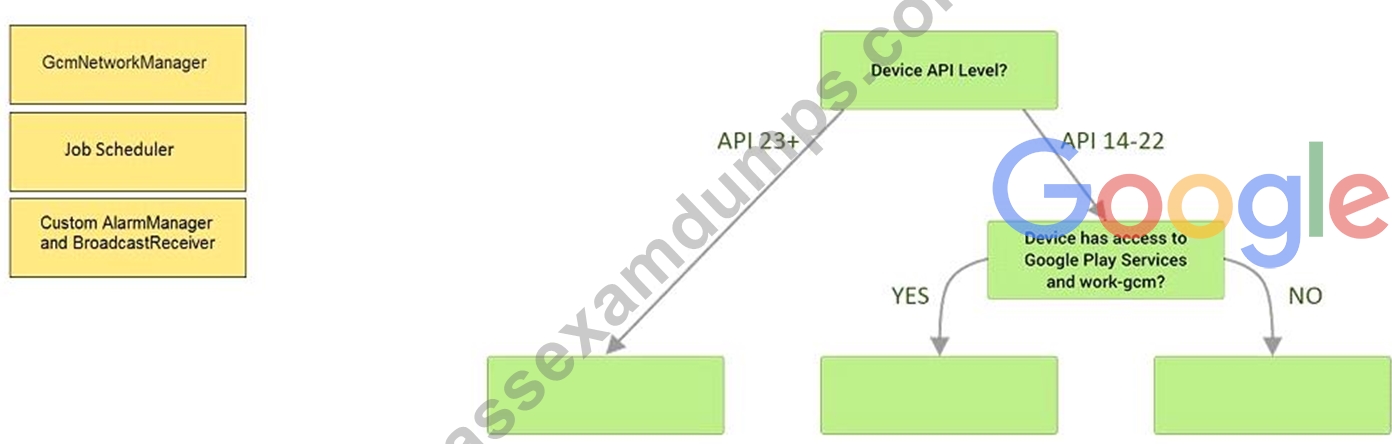
Answer:
Explanation: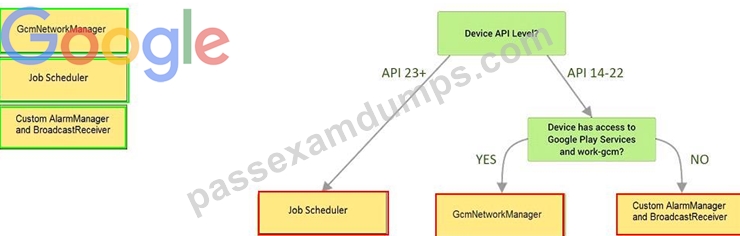
Explanation:
Videos:
Working with WorkManager, from the 2018 Android Dev Summit
WorkManager: Beyond the basics, from the 2019 Android Dev Summit
Reference:
https://developer.android.com/reference/androidx/work/WorkManager?hl=en
NEW QUESTION 30
In a common Paging Library architecture scheme, move instances to the correct positions.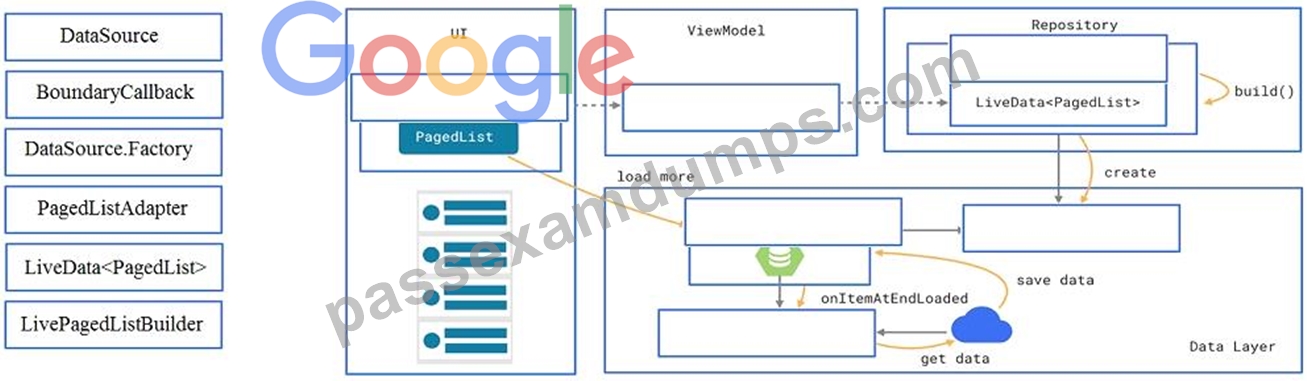
Answer:
Explanation: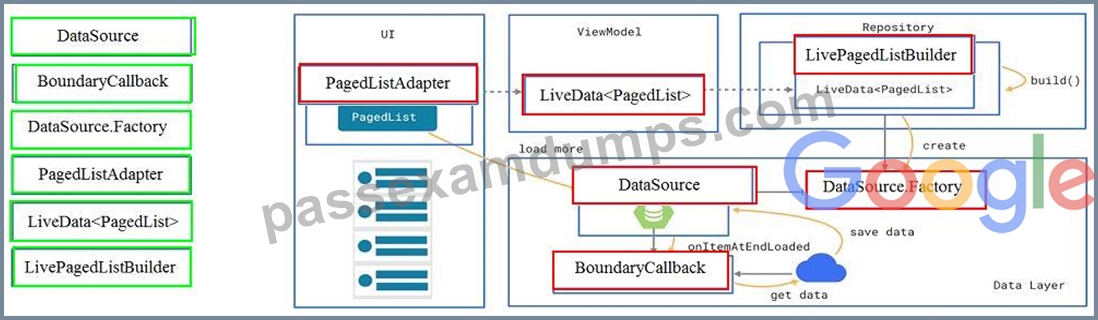
Reference:
https://developer.android.com/topic/libraries/architecture/paging/ui
NEW QUESTION 31
With recommended app architecture. Fill the following diagram, which shows how all the modules usually should interact with one another after designing the app (drag modules to correct places).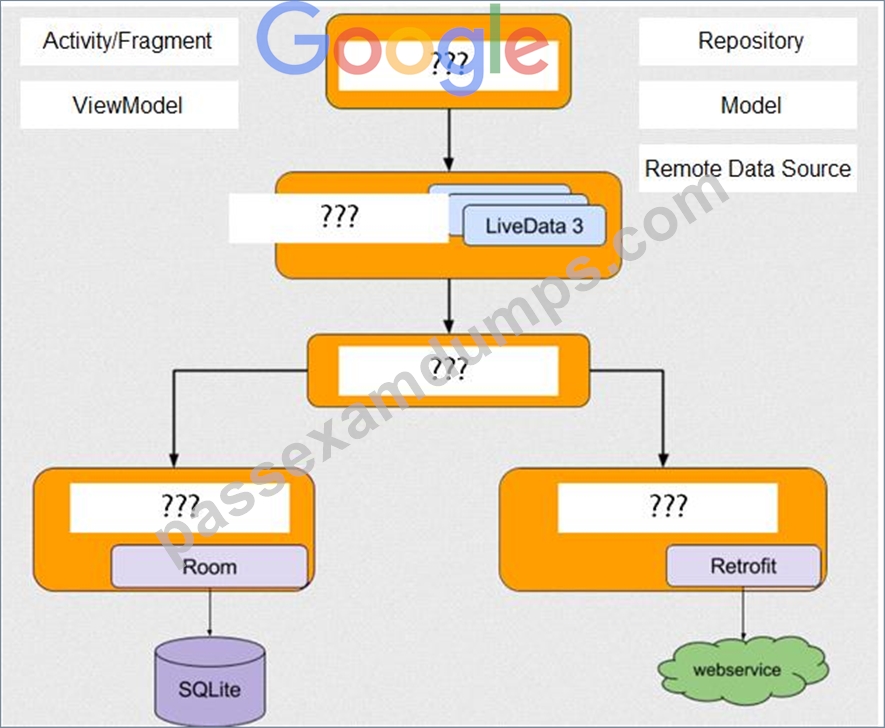
Answer:
Explanation: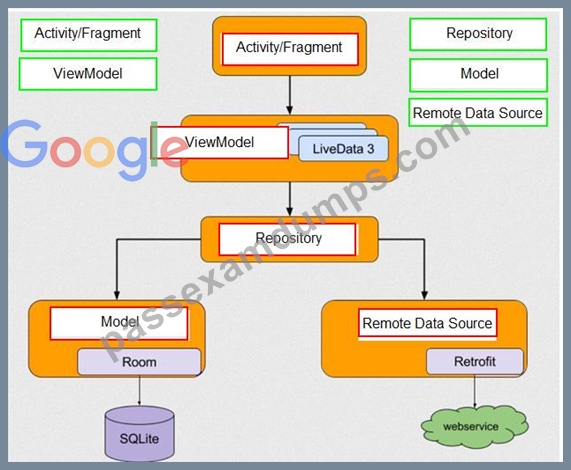
NEW QUESTION 32
Relative positioning is one of the basic building blocks of creating layouts in ConstraintLayout. Constraints allow you to position a given widget relative to another one. What constraints do not exist?
- A. layout_constraintStart_toEndOf
- B. layout_constraintBaseline_toBaselineOf
- C. layout_constraintBaseline_toStartOf
- D. layout_constraintBottom_toBottomOf
Answer: C
Explanation:
Reference:
https://developer.android.com/reference/androidx/constraintlayout/widget/ConstraintLayout
NEW QUESTION 33
RecyclerView is a subclass of ViewGroup and is a more resource-efficient way to display scrollable lists. Instead of creating a View for each item that may or may not be visible on the screen, RecyclerView:
- A. creates a limited number of list items and reuses them for visible content.
- B. creates a single list item and reuses it for visible content.
- C. creates an unlimited number of list items and never reuses them
- D. creates a single list item and never reuses it
Answer: A
Explanation:
Reference:
https://developer.android.com/guide/topics/ui/layout/recyclerview
NEW QUESTION 34
To build a debug APK, you can open a command line and navigate to the root of your project directory. To initiate a debug build, invoke the assembleDebug task:
gradlew assembleDebug
This creates an APK named [module_name]-debug.apk in [project_name]/[module_name]/build/outputs/apk/ Select correct statements about generated file. (Choose all that apply.)
- A. The file is already signed with the debug key
- B. You can immediately install this file on a device.
- C. The file is already aligned with zipalign
Answer: A,B,C
Explanation:
Reference:
https://developer.android.com/studio/run
NEW QUESTION 35
For example, we have a file in our assets folder app/src/main/assets/sample_teas.json. To get an InputStream for reading it, from out Context context, we can try doing this:
- A. InputStream input = context.getResources().getAssets().open ("sample_teas.json");
- B. InputStream input = context.getAssets().open("sample_teas.json");
- C. InputStream input = context.getResources().openRawResource(R.raw.sample_teas);
Answer: B
NEW QUESTION 36
When using an ImageView, ImageButton, CheckBox, or other View that conveys information graphically. What attribute to use to provide a content label for that View?
- A. android:labelFor
Explanation - B. android:hint
- C. android:contentDescription
Answer: C
Explanation:
Reference:
https://support.google.com/accessibility/android/answer/7158690?hl=en
NEW QUESTION 37
As an example. In an Activity we have our TimerViewModel object (extended ViewModel), named mTimerViewModel. mTimerViewModel.getTimer() method returns a LiveData<Long> value. What can be a correct way to set an observer to change UI in case if data was changed?
- A. mTimerViewModel.getTimer().getValue().toString().observe(new Observer<Long>() {
@Override
public void onChanged(Long aLong) {
callAnyChangeUIMethodHere(aLong)
}
}); - B. mTimerViewModel.observe(new Observer<Long>() {
@Override
public void onChanged(Long aLong) {
callAnyChangeUIMethodHere(aLong)
}
}); - C. mTimerViewModel.getTimer().observe(this, new Observer<Long>() {
@Override
public void onChanged(Long aLong) {
callAnyChangeUIMethodHere(aLong)
}
});
Answer: C
NEW QUESTION 38
......
Dumps Brief Outline Of The Associate-Android-Developer Exam: https://www.passexamdumps.com/Associate-Android-Developer-valid-exam-dumps.html
