

Real Data-Integration-Developer Exam PDF Test Engine Practice Test Questions
Talend Data-Integration-Developer Real 2024 Braindumps Mock Exam Dumps
Talend Data-Integration-Developer Exam Syllabus Topics:
| Topic | Details |
|---|---|
| Topic 1 |
|
| Topic 2 |
|
| Topic 3 |
|
| Topic 4 |
|
| Topic 5 |
|
| Topic 6 |
|
| Topic 7 |
|
| Topic 8 |
|
NEW QUESTION # 24
You built multiple Jobs in Studio, each uses its own tDBInput component to connect to a common database server, but they all use different credentials.
How should you configure the tDBInput components?
- A. Set the Property type to Repository and replace the credential1; in each component.
- B. Set the Database file to Metadata
- C. Set the Property type, to Repository and use a common DB connection metadata
- D. Set the Property type to Built-in and set all the relevant properties manually.
Answer: D
Explanation:
Explanation
The tDBInput component allows you to configure the connection properties either by using a built-in mode or by using a repository mode. The built-in mode lets you set all the relevant properties manually, such as host, port, database, username, password, etc. The repository mode lets you reuse an existing connection metadata that is stored in the repository. If you have multiple jobs that use different credentials to connect to a common database server, you should use the built-in mode and set the properties for each job individually. This way, you can avoid creating multiple connection metadata in the repository and maintain them separately. References: Talend Data Integration - Software to Connect, Access, and Transform Data | Talend,
[tDBInput properties - 7.3]
NEW QUESTION # 25
Which types of SQL templates does Talend Studio provide?
Choose 2 answers
- A. System SQL templates
- B. Use-defined SQL templates
- C. Custom SQL templates
- D. System-defined SQL templates
Answer: A,B
Explanation:
Explanation
Talend Studio provides two types of SQL templates: system SQL templates and user-defined SQL templates.
SQL templates are predefined SQL queries that can be used in various components that execute SQL statements, such as tDBInput, tDBRow, tDBOutput, etc. System SQL templates are provided by Talend Studio and cover common SQL operations, such as creating, dropping, or altering tables, inserting, updating, or deleting data, etc. User-defined SQL templates are created by the user and can be customized according to specific needs. User-defined SQL templates can be created by using the SQL Templates view in Talend Studio and can be organized into categories and subcategories. There are no custom SQL templates orsystem-defined SQL templates in Talend Studio. References: Talend Open Studio: Open-source ETL and Free Data Integration | Talend, [SQL Templates - 7.3]
NEW QUESTION # 26
Which options can you use to add a Joblet to your talend Job?
Choose 3 answers
- A. Right-click the Joblet from Palette and select the Add option.
- B. Drag theJobket from the Repository tree view to designer canvas.
- C. Type the Joblet name on the Studio canvas, then select if from the Palette drop-down menu.
- D. Use a tRunJob component and select the Joblet from the drop-down menu.
- E. Drag the Joblet from Palette to the design workspace.
Answer: B,C,E
Explanation:
Explanation
To add a Joblet to your Talend Job, you can use one of these options:
Type the Joblet name on the Studio canvas, then select it from the Palette drop-down menu. This will create a Joblet container on your canvas that contains all the components and links of your Joblet.
Drag the Joblet from Repository tree view to designer canvas. This will also create a Joblet container on your canvas that contains all components and links of your Joblet.
Drag Joblet from Palette to design workspace. This will open a dialog box where you can select an existing Joblet from Repository or create a new one.
You cannot use a tRunJob component and select Joblet from drop-down menu, nor right-click Joblet from Palette and select Add option. These methods are not available in Talend Studio and may cause errors or unexpected results. References: Talend Open Studio: Open-source ETL and Free Data Integration | Talend,
[Joblets - 7.3]
NEW QUESTION # 27
In Talend Studio, you have access to a references project named project_ref. You need to reuse a Job named testJob from the project_ref in your main Job.
- A. Navigate to Metadata, @ project ref, Job Designs, Standard, then select testJob.
- B. Right-click Job Designs, click Crete Standard Job, and enter testJob as the Job name.
- C. Right-click Job Designs and click import items.
- D. Navigate to @ Referenced project, @ project_ref, Job Designs, Standard, then select testJob.
Answer: D
Explanation:
Explanation
To reuse a job named testJob from a referenced project named project_ref in your main job, you need to navigate to @Referenced project, @project_ref, Job Designs, Standard, then select testJob. A referenced project is a project that can be accessed from another project in read-only mode. You can add a referenced project to your main project by using the Project Settings window in Talend Studio. You can then browse the items (such as jobs, metadata, routines, etc.) of the referenced project in the Repository tree view under the
@Referenced project node. You can drag and drop any item from the referenced project to your main job design workspace.
You do not need to use import items, create standard job, or navigate to Metadata options. These options are not used to reuse jobs from referenced projects. The import items option is used to import items (such as jobs, metadata, routines, etc.) from an archive file that can be exported from another project or workspace. The create standard job option is used to create a new job with a name and a description. The Metadata node in the Repository tree view is used to store and manage metadata definitions for various data sources (such as databases, files, web services, etc.). References: Talend Open Studio: Open-source ETL and Free Data Integration | Talend, [Referenced projects - 7.3]
NEW QUESTION # 28
You have two Talend Jobs. Job A need to call Job B. After Job B is complete, processed data stored in the tBufferOutput buffer memory must be transferred back to Job A.
How can you achieve this requirement?
- A. Select the Propagate the child result to output schema in Advanced settings of the tRunJob when calling Job B from Job B.
- B. Select the Propagate the child result to output schema in the Basicsettings of the tRunJob when calling B from Job A.
- C. Select the Transmit whole context in Advanced settings of the tRunJob when calling Job B from Job A.
- D. Select the Transmit whole context in the basic settings of the tRunJob when calling Job B from Job A.
Answer: A
Explanation:
Explanation
To call a different job within a job you are developing, you can use the tRunJob component. This component allows you to execute another job as a subjob within a parent job. To pass the parameters to the job you want to call, you can use the context parameters. Context parameters are variables that can store values that can be changed at runtime or between different contexts. You can define context parameters in the Contexts tab of your job and assign them values for each context. You can also pass context parameters from the parent job to the child job by using the Context Param tab of the tRunJob component. This way, you can parameterize the properties or expressions of the child job with the values from the parent job.
To transfer processed data stored in the tBufferOutput buffer memory back to the parent job, you need to select the Propagate the child result to output schema option in the Advanced settings of the tRunJob component. This option allows you to retrieve the data from the tBufferOutput component of the child job and send it to an output row of the parent job. The tBufferOutput component is used to store data in memory without writing it to disk or database. You can use this component to optimize the performance and memory usage of your job.
You do not need to select the Transmit whole context option in either Basic or Advanced settings of the tRunJob component. This option allows you to pass all the context parameters from the parent job to the child job without specifying them individually. This option does not affect the data transfer from the tBufferOutput component. You also do not need to select the Propagate the child result to output schema option in Basic settings of the tRunJob component, as this option is only available in Advanced settings. References: Talend Open Studio: Open-source ETL and Free Data Integration | Talend, [tRunJob properties - 7.3], [tBufferOutput properties - 7.3], [Contexts - 7.3]
NEW QUESTION # 29
A data professional would like to combine multiple data sources into a relational database to improve their business efficiency.
Which data integration initiative can help them achieve this?
- A. Manually collect the data from various source interfaces,thenclean and combine the data into one warehouse.
- B. Use a middleware application that acts as a mediator to normalize data and bring it into a master data pool.
- C. leverage data lakes to manage complex and massive volumes of structured and unstructured data.
- D. Create a data warehouse to run queries, reports, and analyses to retrieve data in a consistent format.
Answer: B
Explanation:
Explanation
A middleware application is a software that acts as a mediator between different data sources and data consumers. It can normalize data and bring it into a master data pool, which is a centralized repository of consistent and quality data. This can help a data professional to combine multiple data sources into a relational database to improve their business efficiency. A middleware application can also provide data integration services such as data transformation, validation, cleansing, and enrichment. References: What is Data Integration?, What is Middleware?
NEW QUESTION # 30
A colleague has exported a Data Integration Job to run outside Talend Studio.
How do you run the Job?
- A. Install the Job and start the resulting service.
- B. Extract the content of the archive and run the batch file or the shell script.
- C. Extract the contents of the archive and run the batch file and shell script.
- D. Extract the files from the archive and run the JAR file.
Answer: B
Explanation:
Explanation
To run a job that has been exported by a colleague to run outside Talend Studio, you need to extract the content of the archive and run the batch file or the shell script. The archive file contains all the files and libraries required to run the job independently from Talend Studio on any platform that supports Java. The archive file also contains two executable files: a batch file (.bat) for Windows platforms and a shell script (.sh) for Linux platforms. You need to run the appropriate file for your platform by double-clicking on it or using a command line tool. This will launch the job and display its output in a console window.
You do not need to extract the contents of the archive and run both the batch file and shell script, install the job and start the resulting service, or extract the files from the archive and run the JAR file. These methods are not correct or available in Talend Studio and may cause errors or unexpected results. References: Talend Open Studio: Open-source ETL and Free Data Integration | Talend, [Build Job - 7.3]
NEW QUESTION # 31
Using the following input file format as an example:
Which tFileinputDelimted component parameters should you configure to parse the input file correctly?
Choose 3 answers
- A. Header
- B. Field separator
- C. Limit
- D. Footer
- E. Schema
Answer: A,B,E
Explanation:
Explanation
Using the following input file format as an example: <OCR>Name, Phone Abraham Smith, 510-555-5555 ... Steven Doe, 613-555-5555 </OCR> The tFileInputDelimited component parameters that you should configure to parse the input file correctly are Schema, Field separator, and Header. The Schema parameter defines the structure and type of the data in the input file. You can use a built-in schema or a repository schema to specify the columns and their properties.
The Field separator parameter defines the character that separates each field in a row of data. In this case, it is a comma (,). The Header parameter defines the number of rows to be skipped at the beginning of the file. In this case, it is 1, as the first row contains the column names.
NEW QUESTION # 32
Which statements ate true about a tWarn component?
Choose 2 answers
- A. Used to trigger a warning often caught by the tLogCatcher component for an exhaustive log.
- B. Used alongside a tLogCatcher in order for the log data collected to be encapsulated and passed on to the output defined.
- C. Used only in conjunction with a iLogCatcher component.
- D. Used only in conjunction with the log4j feature.
Answer: A,B
Explanation:
Explanation
The tWarn component is used to trigger a warning message that can be caught by the tLogCatcher component for an exhaustive log. The tLogCatcher component is a component that collects the log data generated by the tWarn, tDie, and Java Exception components and passes it on to the output defined. The tWarn component can be used alongside a tLogCatcher component in order for the log data collected to be encapsulated and passed on to the output defined. The tWarn component can also be used independently of the tLogCatcher component, but in that case, the warning message will only be displayed in the console. The tWarn component is not used only in conjunction with the log4j feature, nor only in conjunction with a tLogCatcher component.
The log4j feature is a logging framework that allows you to customize the logging level, format, and destination of your log messages. You can enable or disable the log4j feature in Talend Studio by checking or unchecking the Use log4j option in the Preferences menu. The tLogCatcher component can catch log data from other components besides the tWarn component, such as the tDie and Java Exception components. References: Talend Open Studio: Open-source ETL and Free Data Integration | Talend,
NEW QUESTION # 33
You are building a complex Job and want to explore different optionsfor optimizing execution timesusing parallelism.
How can you identify execution times to verify the effectiveness of your changes?
Choose 2 answers
- A. Observing the execution times that annotate the flows in the Designer.
- B. Observing the execution time in the Code view.
- C. Comparing time stamp in Trace Debug mode.
- D. Heading the time stamps from the execution console in the Run view.
Answer: A,D
Explanation:
Explanation
To identify execution times to verify the effectiveness of your changes, you can use one of these methods:
Reading the time stamps from the execution console in the Run view. This method allows you to see the start and end time of each subjob and component in your job, as well as the total execution time of the job. You can also see the number of rows processed by each component and the status of the job (success or failure).
Observing the execution times that annotate the flows in the Designer. This method allows you to see the execution time of each flow (main, lookup, reject, etc.) between components in your job. You can also see the number of rows processed by each flow and the throughput (rows per second) of each flow.
You cannot use these methods to identify execution times:
Observing the execution time in the Code view. This method does not show you the execution time of your job or its components, but only the generated code of your job in Java or Perl. The Code view is useful for debugging or customizing your code, but not for measuring performance.
Comparing time stamps in Trace Debug mode. This method does not show you the execution time of your job or its components, but only the values of eachcolumn for each row processed by your job. The Trace Debug mode is useful for tracing data quality or transformation issues, but not for measuring performance. References: Talend Open Studio: Open-source ETL and Free Data Integration | Talend,
[Run view - 7.3], [Designer - 7.3], [Code view - 7.3], [Trace Debug mode - 7.3]
NEW QUESTION # 34
You create a Job consisting of two subJobs, A and B. You added Joblet C with the intension of running it between A and B.
What are the minimum requirements to orchestrate this?(Choose Two)
- A. Add TRIGGER_INPUT and TRIGGER_OUTPUT components into B.
- B. Add TRIGGER_INPUT and TRIGGER_OUTPUT components into A.
- C. Link A, B and C using On Subject Ok triggers.
- D. Add TRIGGER_INPUT and TRIGGER_OUTPUT components into C
Answer: C,D
Explanation:
Explanation
To create a job consisting of two subjobs, A and B, and add a Joblet C with the intention of running it between A and B, you need to do the following steps:
Design subjob A by adding components and links to it in the Designer workspace.
Add a Start component to mark the beginning of subjob B and link it to subjob A using an OnSubjobOk trigger.
Design subjob B by adding components and links to it after the Start component in the Designer workspace.
Add a tJobletTriggerInput component to your Joblet C design and link it to other components in your Joblet using data flows or triggers.
Add a tJobletTriggerOutput component to your Joblet C design and link it to other components in your Joblet using data flows or triggers.
Drag your Joblet C from the Repository tree view to the Designer workspace between subjob A and subjob B.
Link your Joblet C to subjob A using an OnComponentOk trigger from the last component of subjob A to the tJobletTriggerInput component of your Joblet C.
Link your Joblet C to subjob B using an OnComponentOk trigger from the tJobletTriggerOutput component of your Joblet C to the Start component of subjob B.
The minimum requirements to orchestrate this are adding TRIGGER_INPUT and TRIGGER_OUTPUT components into C and linking A, B, and C using OnSubjobOk triggers. These are generic components that allow you to define triggers for your Joblet without depending on specific components. You do not need to add TRIGGER_INPUT and TRIGGER_OUTPUT components into A or B, as these are regular subjobs that can use any type of components or triggers. References: Talend Open Studio: Open-source ETL and Free Data Integration | Talend, [tJobletTriggerInput properties - 7.3], [tJobletTriggerOutput properties - 7.3], [Joblets -
7.3], [Triggers - 7.3]
NEW QUESTION # 35
Where can you specify the remote JobServer to execute a Job?
- A. Run/Debug section in the Preference window
- B. Target Exec tab in the Run view
- C. Extra tab in the Job view
- D. Job settings section of the Project Settings windows
Answer: B
Explanation:
Explanation
To specify the remote JobServer to execute a job, you need to use the Target Exec tab in the Run view of Talend Studio. The Run view allows you to configure and execute your job from Talend Studio. The Target Exec tab allows you to select whether you want to run your job locally or remotely on a JobServer. A JobServer is a server application that allows you to execute jobs remotely from Talend Studio or Talend Administration Center. To run your job on a remote JobServer, you need to select Remote Jobserver option from the drop-down menu and select or add a JobServer connection from the list.
You do not need to use Job settings section of Project Settings window, Extra tab in Job view, or Run/Debug section in Preferences window. These windows are not used to specify remote JobServer execution. The Job settings section of Project Settings window is used to configure general settings for your jobs, such as versioning, statistics, logs, etc. The Extra tab in Job view is used to configure extra features for your job, such as implicit context load, tStatCatcher, tLogCatcher, etc. The Run/Debug section in Preferences window is used to configure run/debug settings for your Talend Studio, such as JVM arguments, execution mode, etc. References: Talend Open Studio: Open-source ETL and Free Data Integration | Talend, [Run view - 7.3],
[Project Settings - 7.3], [Job view - 7.3], [Preferences - 7.3]
NEW QUESTION # 36
Which statement is true about the Sync columns button on the Basic settings tab of the Component view?
Choose 2 answers
- A. Retrieves the schema from the input component connected in the lob.
- B. Retrieves and synchronizes the output file schema with the input file schema for tFileOutputed limited.
- C. Retrieves the schema of the current component to match the Next component
- D. Retrieves and synchronizes the output schema with the input schema for tJavaRow.
Answer: A,D
Explanation:
Explanation
The Sync columns button on the Basic settings tab of the Component view retrieves the schema from the input component connected in the Job and synchronizes it with the current component's schema. This button is available for most of the components that have an input and an output schema, such as tJavaRow, tMap, tFileOutputDelimited, etc. However, this button does not retrieve and synchronize the output file schema with the input file schema for tFileOutputDelimited, as this component only has one output schema.
NEW QUESTION # 37
You have a tMap component whose main input provides the following data:
There is also a lookup table with the following data: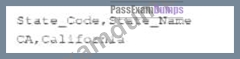
An inner join is configuredbetween the State column of the main input with the State Code column of the lookup table.
What happens when the row containing the name Andrew laylor is processed?
- A. If an output is configured to collect inner join rejects, the data flows to that output as well as the main output.
- B. If an output is configured to collect inner join rejects, the data flows only to that output.
- C. If an output is not configured to collect inner Join rejects, the data flows to the main output.
- D. If an output is not configured to collect inner join rejects, an error condition is raises.
Answer: B
Explanation:
Explanation
The tMap component allows you to perform data transformations and joins between multiple input sources and output targets. You can configure different types of joins between the main input and the lookup tables, such as inner join, left outer join, right outer join, etc. An inner join returns only the matching rows from both tables based on a join condition. If a row from the main input does not match any row from the lookup table, it is considered as an inner join reject. You can configure an output to collect these rejects by setting the Catch inner join reject option to true. If you do so, the data will flow only to that output and not to the main output. If you do not configure an output to collect the rejects, the data will be ignored and no error will be raised. References: Talend Open Studio: Open-source ETL and Free Data Integration | Talend, [tMap properties - 7.3]
NEW QUESTION # 38
Which section in Talend Studio allows you to graphically connect components in a Job to run a dataflow process?
- A. Design workspace
- B. Repository
- C. Code
- D. Component view
Answer: A
Explanation:
Explanation
The design workspace in Talend Studio allows the user to graphically connect components in a Job to run a dataflow process. The design workspace is the main area where the user can design the data integration logic by dragging and dropping components from the palette and linking them with connectors. The design workspace also shows the schema of each component, which defines the structure and type of the data.
NEW QUESTION # 39
You need to set up a server in your Talend environment that enables several members of your team to collaborate on a project.
Which application must you enable before working on a remote project?
- A. Talend admission Center service must be running on each development workstation.
- B. Git or SVN server instance must be running.
- C. Talent Administration Center instance must be running with the team members and project configured.
- D. Git or SVN client must be installed on each developed workstation.
Answer: B,C
Explanation:
Explanation
To set up a server in your Talend environment that enables several members of your team to collaborate on a project, you need to enable two applications before working on a remote project: Git or SVN server instance and Talend Administration Center instance. These applications are used to manage version control and collaboration for your project.
Git or SVN server instance is a server application that allows you to store and track changes of your project files using a version control system. Git and SVN are two popular version control systems that are supported by Talend Studio. You need to have a Git or SVN server instance running and accessible by your team members before working on a remote project. You also need to have a Git or SVN client installed on each development workstation to connect to the server and perform version control operations.
Talend Administration Center is a web-based application that allows you to manage users, projects, tasks, execution servers, and licenses for your Talend environment. You need to have a Talend Administration Center instance running and accessible by your team members before working on a remote project. You also need to configure the team members and project settings in Talend Administration Center to grant access and permissions for your project. References: Talend Open Studio: Open-source ETL and Free Data Integration | Talend, [Version control - 7.3], [Talend Administration Center - 7.3]
NEW QUESTION # 40
A data professional would like to combine multiple data sources into a relational database to improve their business efficiency.
Which data integration initiative can help them achieve this?
- A. Manually collect the data from various source interfaces,thenclean and combine the data into one warehouse.
- B. Use a middleware application that acts as a mediator to normalize data and bring it into a master data pool.
- C. leverage data lakes to manage complex and massive volumes of structured and unstructured data.
- D. Create a data warehouse to run queries, reports, and analyses to retrieve data in a consistent format.
Answer: B
Explanation:
Explanation
A middleware application is a software that acts as a mediator between different data sources and data consumers. It can normalize data and bring it into a master data pool, which is a centralized repository of consistent and quality data. This can help a data professional to combine multiple data sources into a relational database to improve their business efficiency. A middleware application can also provide data integration services such as data transformation, validation, cleansing, and enrichment. References: What is Data Integration?, What is Middleware?
NEW QUESTION # 41
Where do you access the option to create a Joblet from an existing Job?
- A. Selecting the File menu.
- B. Adding a Joblet component to the Designer.
- C. Right-clicking the I oh in the Repository
- D. Selecting the desired components and right-clicking.
Answer: D
Explanation:
Explanation
To create a Joblet from an existing Job, you can follow these steps:
Open the Job that you want to create a Joblet from.
Select the components that you want to include in the Joblet.
Right-click on the selected components and select Create Joblet from the context menu.
In the Create Joblet dialog box, enter a name and description for the Joblet.
Click Finish to create the Joblet.
References:
Talend Open Studio User Guide: Creating a Joblet from a Job:
https://help.talend.com/r/en-US/8.0/studio-user-guide/creating-joblet-from-job
NEW QUESTION # 42
Which factors can affect the context in which a Job is run?
Choose 2 answers
- A. tRunJob component can influence the context in which the child Job runs.
- B. tContextLoad component can change the context name in the course of the Job execution.
- C. Context chosen by the developer when running the Job. Context available in the Basic Run tab of Run Job section.
- D. tContextDump component ran change the context name in the course of the lob execution.
Answer: A,C
Explanation:
Explanation
The context in which a job is run can be affected by different factors, such as the context chosen by the developer when running the job, or the tRunJob component that can influence the context in which the child job runs. The context chosen by the developer when running the job can be selected from the Basic Run tab of Run Job section in Talend Studio. This allows the developer to test the job with different sets of context variables without modifying the job design. The tRunJob component can be used to call another job as a subjob within a parent job. The tRunJob component can pass the context parameters from the parent job to the child job, or use a specific context for the child job. This allows the developer to reuse existing jobs and control their execution contexts. The tContextLoad component and the tContextDump component do not affect the context name in which a job is run, but they can affect the context values. The tContextLoad component can load context parameters from a file or a database table at runtime and overwrite the existing values. The tContextDump component can display or save the current context parameters and their values for debugging purposes. References: Talend Data Integration - Software to Connect, Access, and Transform Data | Talend, [tRunJob properties - 7.3], [tContextLoad properties - 7.3], [tContextDump properties - 7.3]
NEW QUESTION # 43
......
Prepare For The Data-Integration-Developer Question Papers In Advance: https://www.passexamdumps.com/Data-Integration-Developer-valid-exam-dumps.html
Released Talend Data-Integration-Developer Updated Questions PDF: https://drive.google.com/open?id=1AHC6kZYtLfYojcbVoAa6YAAbMKhoJHRl
